> ## Documentation Index
> Fetch the complete documentation index at: https://docs.agicto.com/llms.txt
> Use this file to discover all available pages before exploring further.
# Cursor 接入
> 在 Cursor 中使用 AGICTO API
你可以在 Cursor 中配置 AGICTO API,用 OpenAI 兼容格式调用模型。
 ## 准备
* 已安装 Cursor
* 已开通 Cursor Pro。Cursor 免费版不支持切换自定义模型
* 已从 AGICTO 控制台 复制 API Key。`sk-` 开头的是 API Key
* 已从 模型广场 复制可用模型名
* 已确认你的账户有可用余额或额度
## 配置方式
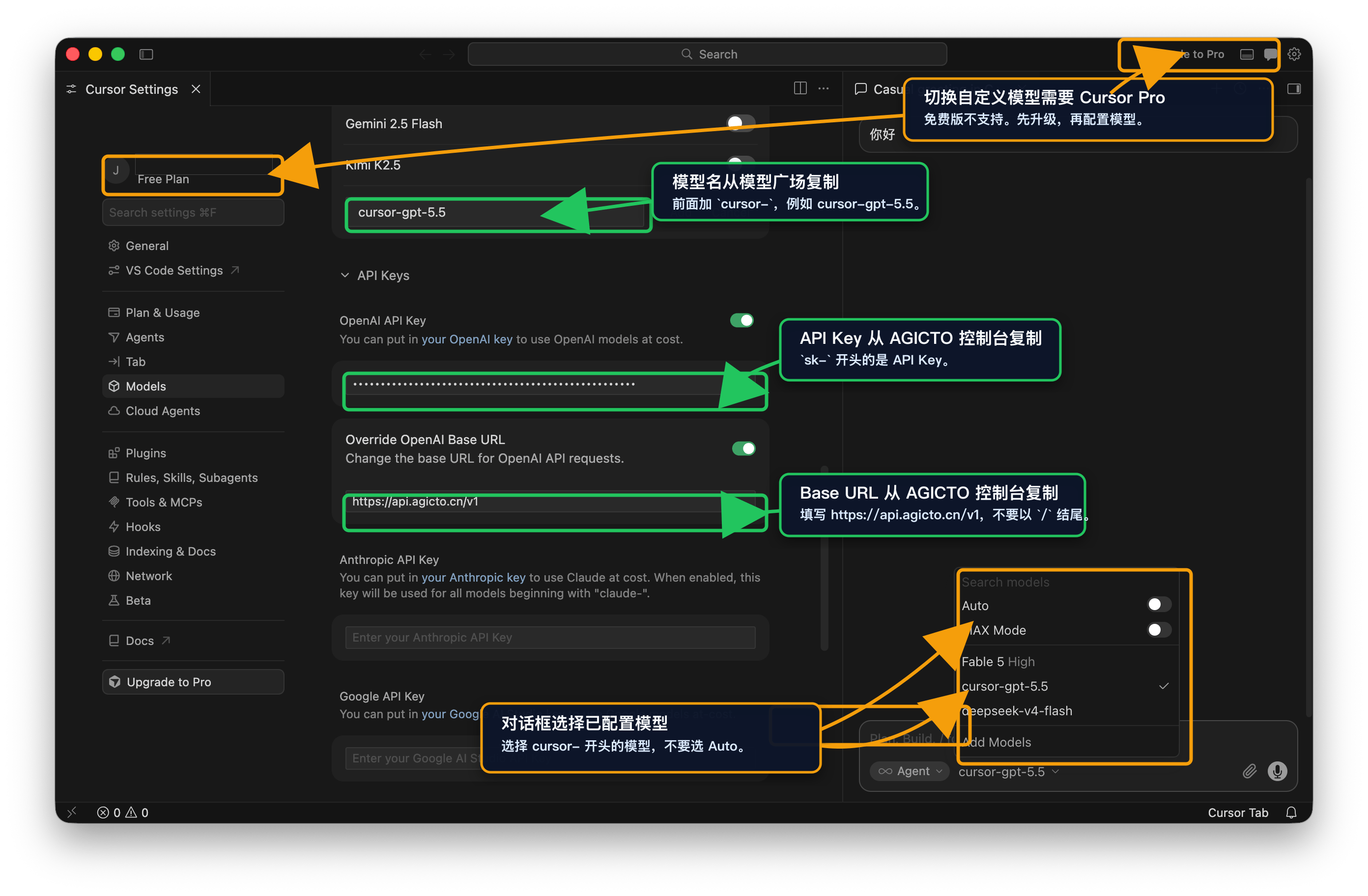
在 Cursor 中打开 **Settings**,进入模型或 API Provider 配置区域。
确认当前账号可使用 Cursor Pro。免费版不能切换自定义模型。
从 AGICTO 控制台复制 Base URL,填入 `https://api.agicto.cn/v1`。不要在末尾添加 `/`。
从 AGICTO 控制台复制 API Key,填入 OpenAI API Key 字段。`sk-` 开头的是 API Key。
从模型广场复制模型名,在前面加 `cursor-`,例如 `cursor-MODEL_NAME`。点击 **Add** 保存模型。
回到对话框,在模型下拉菜单中选择刚配置的 `cursor-` 模型。不要选择 **Auto**。
## 配置值
| 字段 | 值 |
| ---------------- | -------------------------- |
| Base URL | `https://api.agicto.cn/v1` |
| API Key | 你的 AGICTO API Key |
| Model / Model ID | `cursor-MODEL_NAME` |
| 格式 | OpenAI 兼容格式 |
Cursor 免费版不支持切换自定义模型。你需要使用 Cursor Pro,并在对话框中手动选择已配置的 `cursor-` 模型。
## 准备
* 已安装 Cursor
* 已开通 Cursor Pro。Cursor 免费版不支持切换自定义模型
* 已从 AGICTO 控制台 复制 API Key。`sk-` 开头的是 API Key
* 已从 模型广场 复制可用模型名
* 已确认你的账户有可用余额或额度
## 配置方式
在 Cursor 中打开 **Settings**,进入模型或 API Provider 配置区域。
确认当前账号可使用 Cursor Pro。免费版不能切换自定义模型。
从 AGICTO 控制台复制 Base URL,填入 `https://api.agicto.cn/v1`。不要在末尾添加 `/`。
从 AGICTO 控制台复制 API Key,填入 OpenAI API Key 字段。`sk-` 开头的是 API Key。
从模型广场复制模型名,在前面加 `cursor-`,例如 `cursor-MODEL_NAME`。点击 **Add** 保存模型。
回到对话框,在模型下拉菜单中选择刚配置的 `cursor-` 模型。不要选择 **Auto**。
## 配置值
| 字段 | 值 |
| ---------------- | -------------------------- |
| Base URL | `https://api.agicto.cn/v1` |
| API Key | 你的 AGICTO API Key |
| Model / Model ID | `cursor-MODEL_NAME` |
| 格式 | OpenAI 兼容格式 |
Cursor 免费版不支持切换自定义模型。你需要使用 Cursor Pro,并在对话框中手动选择已配置的 `cursor-` 模型。